
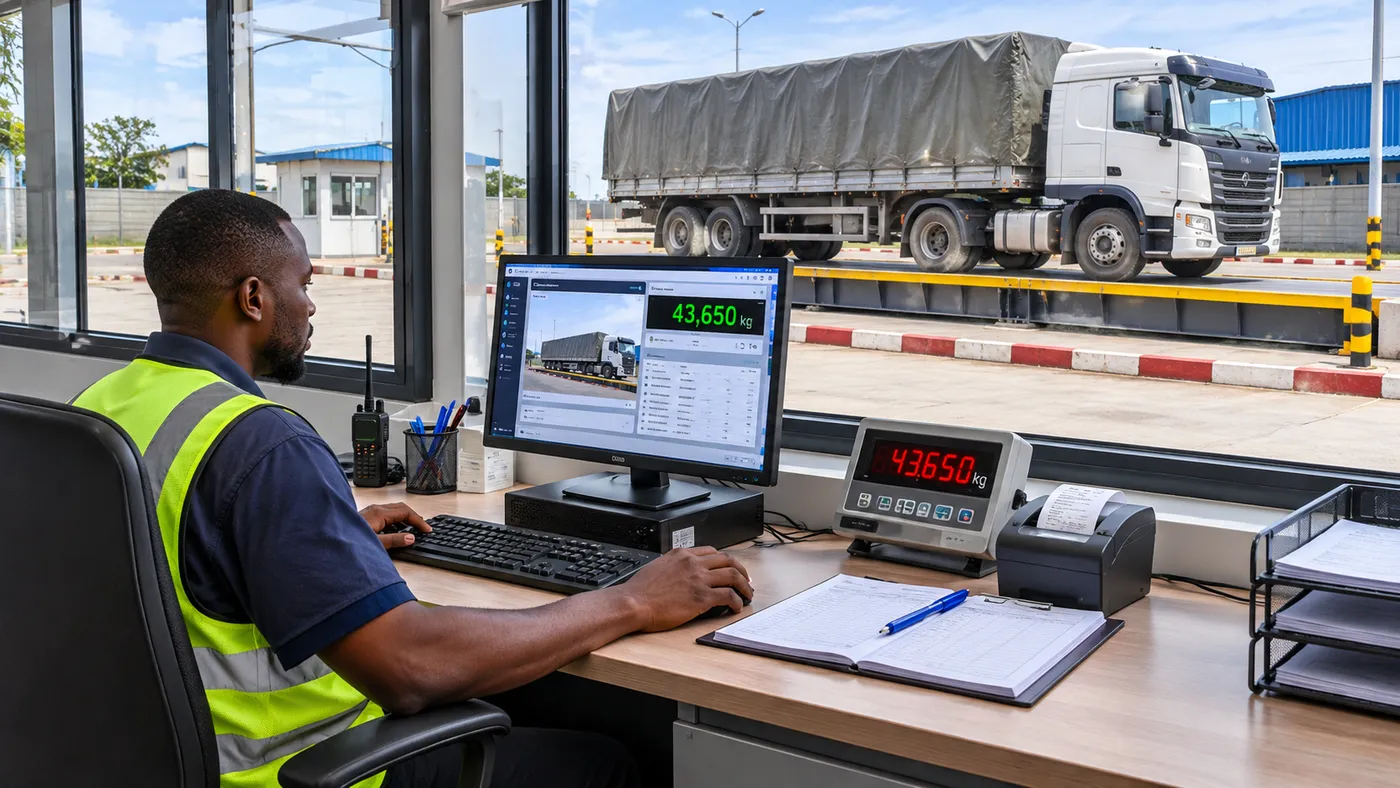
Introduction: Understanding Digital Weighbridge Software
Modern businesses that handle bulk materials, agricultural produce, construction materials, industrial products and commercial transportation depend on accurate weighing systems to manage their daily operations.
A commercial truck weighbridge provides the physical platform for weighing vehicles, but the weighing process also requires an electronic system to capture, process, display and store weight information.
This is where digital weighbridge software becomes important.
Weighbridge software works alongside the weighing indicator and load cell system to help operators record truck weights, process weighing transactions, generate tickets and maintain transaction records.
For businesses operating quarries, factories, warehouses, logistics terminals, agricultural processing facilities and distribution centres, an effective weighing management system can improve record keeping, operational efficiency and accountability.
At Kira Scales Limited, we supply commercial truck weighbridges and weighing management solutions for businesses across Nigeria.
In this guide, we explain how digital weighbridge software works, its main components, the weighing process and how businesses can use weighing data more effectively.
What Is Digital Weighbridge Software?
Digital weighbridge software is a computer-based application used to manage and record weighing transactions performed on a truck weighbridge.
It works with electronic weighing equipment to capture weight readings and associate them with relevant transaction information.
Depending on the software configuration, recorded information may include:
Vehicle registration number.
Truck identification details.
Gross vehicle weight.
Tare vehicle weight.
Net material weight.
Date and time of weighing.
Customer or supplier details.
Product or material description.
Operator information.
Transaction reference number.
These records help businesses maintain a history of vehicle weighing activities and retrieve transaction information when required.
How Does a Digital Weighbridge System Work?
A digital truck weighbridge operates through several interconnected components. Each component performs a specific function during the weighing process.
1. Weighbridge Platform
The weighbridge platform is the physical structure on which commercial vehicles drive during weighing.
It is designed to support the weight of trucks and their loads while transferring the applied force to the load cells.
Platform dimensions and capacity depend on the type of vehicles and materials being weighed.
For example, an 18-metre-long, 3-metre-wide platform is commonly used for commercial truck weighing applications.
2. Load Cells
Load cells are electronic sensors installed beneath the weighbridge platform.
Their primary function is to detect the force applied by the truck and convert it into an electrical signal.
The signals from the load cells are transmitted to the weighing indicator for processing.
The quality, capacity, installation and calibration of load cells are important factors in the accuracy and reliability of a weighbridge.
Kira Scales Limited supplies weighing systems incorporating suitable industrial load cell solutions, including Zemic load cells.
3. Digital Weighing Indicator
The digital weighing indicator receives signals from the load cells and processes them into weight readings.
It displays the measured weight on its digital screen, allowing the operator to view the truck's weight.
Depending on the indicator model, communication interfaces such as RS232 or RS485 may be available for connecting computers, printers and other compatible equipment.
The indicator is an important connection between the physical weighing platform and the software used to manage transactions.
4. Computer and Weighbridge Management Software
Sistema De Pesagem De Caminhões - Balança Rodoviária | Parcelamento sem juros
The computer runs the weighing management software used by the operator.
The software receives weight information from the indicator and allows the operator to record transactions.
Depending on the software, the operator can enter vehicle details, select material descriptions, save transactions and generate weighing reports.
This helps reduce reliance on handwritten records and makes historical transactions easier to retrieve.
5. Printer and Weighing Tickets
A weighing printer is used to produce physical records of completed weighing transactions.
Depending on the software configuration, the weighing ticket may contain:
Company name.
Vehicle registration number.
Transaction number.
Gross weight.
Tare weight.
Net weight.
Date and time.
Material description.
The printed ticket can be issued to the truck driver or retained as part of the company's transaction documentation.
How Does the Truck Weighing Process Work?
Most commercial truck weighing operations involve two main measurements: gross weight and tare weight.
Step 1: First Weighing – Gross Weight
The loaded truck drives onto the weighbridge platform.
Once the vehicle is properly positioned and the weight reading stabilises, the operator records the gross weight.
Gross weight represents the combined weight of the truck, its body and the material being transported.
Step 2: Second Weighing – Tare Weight
After unloading the material, the truck returns to the weighbridge for another measurement.
The empty vehicle is weighed to determine its tare weight.
Tare weight represents the weight of the vehicle without the transported load.
Step 3: Calculate Net Weight
The net weight of the transported material is calculated by subtracting the tare weight from the gross weight.
Formula:
Net Weight = Gross Weight − Tare Weight
For example:
Measurement
Weight
Gross weight
45,000 kg
Tare weight
15,000 kg
Net material weight
30,000 kg
The software can store these measurements and generate the corresponding weighing record.
Step 4: Generate and Store Weighing Records
After the transaction is completed, the software saves the weighing information.
Depending on its capabilities, records can be retrieved, printed, reviewed or exported for reporting purposes.
Benefits of Using Digital Weighbridge Software
1. Improved Record Keeping
Digital weighing records make it easier to maintain transaction histories and retrieve previous weighing information.
2. Faster Weighing Operations
Operators can capture vehicle information, record weight readings and generate tickets through a computer-based interface.
3. Better Operational Accountability
Recorded transactions provide businesses with information that can support internal reviews and operational supervision.
4. Easier Reporting
Exporting weighing records into Excel, Word or PDF allows businesses to prepare reports and share information with relevant departments.
5. Reduced Dependence on Manual Documentation
Digital transaction records reduce the need to rely entirely on handwritten weighing logs.
6. Improved Business Coordination
Weighing information can be shared with logistics, warehouse, finance and management teams to support operational decisions.
Can Weighbridge Software Be Connected to ERP or Business Management Systems?
Yes, depending on the capabilities of the weighing indicator, software and available communication interfaces.
Some weighing systems support integration with external applications, ERP platforms, inventory management systems and other business applications.
For example, a manufacturing company may want to connect its weighbridge transactions with its inventory management system to improve the recording of incoming raw materials and outgoing finished products.
A logistics company may require vehicle weighing information to be associated with delivery documentation.
However, integration is not automatic. It requires compatible interfaces, suitable software and appropriate configuration or development.
Businesses planning such integration should discuss their requirements with their weighbridge supplier before installation.
Can Weighbridge Software Support Remote Monitoring?
Some weighing management platforms offer advanced remote monitoring and network-based reporting capabilities.
However, not all software packages provide these features.
For businesses whose weighing software does not support built-in remote monitoring, alternative arrangements include:
HDMI screen mirroring within the same facility.
Remote Desktop access through suitable third-party applications.
Exporting weighing records to Excel, Word or PDF for sharing.
Read our detailed guide: Remote Weighbridge Monitoring in Nigeria: How to Monitor Truck Weighing Operations Remotely.
Why Choose Kira Scales Limited for Digital Weighbridge Solutions?
Kira Scales Limited provides commercial and industrial weighing solutions designed for different business applications across Nigeria.
Our services include:
Commercial truck weighbridge supply.
Digital weighing indicators and load cells.
Weighbridge management software.
Computer and printer configurations.
Weighbridge installation and commissioning.
Calibration and certification.
Civil works guidance and supervision.
Maintenance and technical support.
We understand that businesses have different weighing requirements. Our team works with clients to identify suitable weighbridge configurations based on vehicle capacity, operational frequency, site conditions and software requirements.
Whether you require a new truck weighbridge or an upgrade to your existing weighing system, we can assist with the equipment and technical requirements.
Frequently Asked Questions
What is the main function of weighbridge software?
Weighbridge software records and manages truck weighing transactions. It helps operators capture vehicle details, save weight readings, generate tickets and retrieve transaction records.
Does a weighbridge need a computer to operate?
The digital weighing indicator can display weight readings independently. However, a computer and suitable software are required for computer-based transaction management, reporting and record keeping.
Can weighbridge software calculate net weight automatically?
Yes. Depending on the software configuration, net weight can be calculated by subtracting the tare weight from the gross weight.
Can I export weighbridge records to Excel?
Yes, if the installed software supports this functionality. Some systems also support Word and PDF exports.
Can weighbridge software be integrated with ERP systems?
Yes, where the weighing equipment and software support compatible communication interfaces and integration requirements.
Can I monitor weighbridge transactions remotely?
This depends on the software and available infrastructure. Remote Desktop, HDMI mirroring and shared weighing records are possible alternatives where appropriate.
What equipment is required for a complete digital weighbridge system?
A typical system includes a weighbridge platform, load cells, junction box, digital weighing indicator, computer, weighing software and printer.
Conclusion
Digital weighbridge software plays an important role in modern commercial weighing operations. By connecting the weighing equipment to a computer-based transaction management system, businesses can capture truck weights, maintain records, generate tickets and improve access to weighing information.
However, selecting the right software is just as important as choosing the appropriate weighbridge platform and load cells.
Businesses should consider their operational requirements, reporting needs, communication interfaces and future integration plans before selecting a weighing system.
At Kira Scales Limited, we provide commercial weighbridge systems, installation, calibration and technical support to businesses across Nigeria.
Contact us today for professional guidance and a quotation for your truck weighbridge requirements.
Kira Scales Limited
Weighbridge Supply, Installation, Calibration and Technical Support in Nigeria.
Address: 38 Opebi Road, Ikeja, Lagos, Nigeria.
Kira Scales Limited
Need Industrial Weighing Equipment?
We supply, install, and maintain weighbridges, floor scales, crane scales, and more across all 36 states in Nigeria. Free site survey on all weighbridge projects.